
Help
Support and troubleshooting
- Private support: Email taxon@axelgraff.fr.
- Public bug reports: File an issue at GitHub Issues.
-
TestFlight participants: Follow the beta testing guide.
Do not include private information, personal identifiers, confidential text, or screenshots containing sensitive content in a public issue.
Before you start
If you come across an unfamiliar name while reading, select it and use the Share Sheet to send it to Taxon Translate. Taxon Translate shows the names in an overlay. Close the overlay to continue reading exactly where you left off.
If you want to see the image and other details, close the overlay and open Taxon Translate within the next hour. The app will open the same taxon.
1. Choose your languages
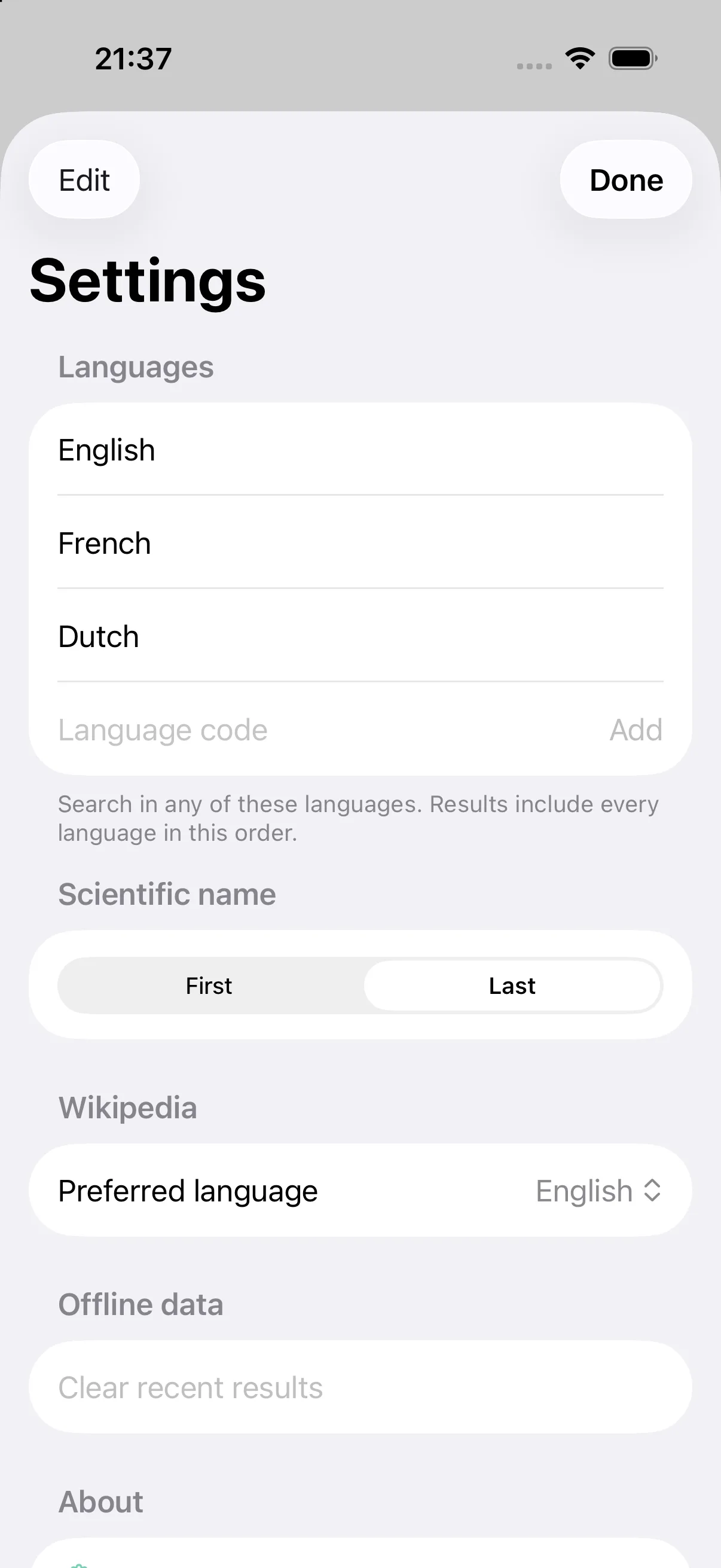
Open Taxon Translate once, then open Settings → Languages. Choose the languages whose common names you want to see and place them in your preferred order.
2. Add Taxon Translate to the Share Sheet
- In an iPhone app that lets you share selected text—for example, Safari or Notes—select the name of an animal, plant, or fungus and choose Share.
- If Taxon Translate is not visible, scroll through the Share Sheet and choose More.
- Add Taxon Translate to the preferred actions and move it near the front if desired.
You can now look up selected names, birds on Merlin Bird ID species pages, and animals, plants, or fungi on Wikipedia article pages.
3. Add Taxon Translate to Shortcuts
Open Shortcuts and choose Add Action → Apps → Taxon Translate. The available actions can be combined with other Shortcut actions:
- Resolve Taxon accepts a common or scientific name and finds the matching animal, plant, or fungus. If several matches are possible, it asks you to choose.
- Get Taxon Name takes that result and returns its common name in one language. Enter a language code such as
fr,nl, oren-GB. - Get Configured Taxon Names takes that result and shows the common names in your configured languages, plus the scientific name. Choose Open in Taxon Translate to continue in the full app, or dismiss the result to return to what you were doing.
The actions also return values for the next action in the Shortcut. Add Copy to Clipboard if you want to paste the names elsewhere.
Using Taxon Translate
Look up a name while reading
- In an iPhone app that lets you share selected text—for example, Safari or Notes—select the name of an animal, plant, or fungus.
- Choose Share from the selection menu.
- Choose Taxon Translate in the system Share Sheet.
- Review the sourced names in your configured languages and the scientific name.
Look up a bird from a Merlin page
- Open a public species page in Merlin Bird ID or on the Merlin website.
- Choose Share, then choose Taxon Translate in the system Share Sheet.
- Review the sourced names in your configured languages and the scientific name.
Look up a taxon from a Wikipedia article
From a Wikipedia article about an animal, plant, or fungus, Taxon Translate can find the linked taxon and show its names in your languages. You do not need to select or copy the article title.
- Open the article in Wikipedia or Safari.
- Choose Share, then choose Taxon Translate in the system Share Sheet.
- Review the sourced names in your configured languages and the scientific name.
This also provides a way to look up names after Apple Visual Intelligence identifies an organism. Open the Visual Intelligence result in Wikipedia, choose Share, and then choose Taxon Translate. Visual Intelligence does not currently offer Taxon Translate directly, so its Wikipedia result is the available route into the lookup.
Taxon Translate accepts localized article URLs such as https://en.wikipedia.org/wiki/Acer_campestre. It uses the article’s structured Wikipedia identity rather than guessing from its title or parsing the page text. Pages without a linked biological taxon return no result.
Look up a copied species with a Shortcut
The Lookup Species Shortcut lets you look up a species you have copied to the clipboard. This works in Books and anywhere else you can copy text.
Select the species name and tap Copy. Then run Lookup Species.
You can run it from the Shortcuts app, add it to your Home Screen, assign it to the Action button, or use Back Tap.
Add the Lookup Species Shortcut
Apple Books does not currently show third-party Share or Action extensions, including Taxon Translate, for selected book text—even when the book allows sharing. This limitation is controlled by Books; an Apple Frameworks Engineer describes its predefined recipient list.
Troubleshooting
Which languages are supported?
Taxon Translate lets you add many languages in Settings → Languages by entering a language name or an ISO 639 standard language code. However, not every language in the world is supported.
The available names come from Catalogue of Life and Wikidata. Taxon Translate displays the common names recorded in these sources and cannot create or translate missing names.
Why does a selectable language have few or no names?
A language may be available for selection even when the source databases contain few meaningful entries for it. Coverage varies widely by language and taxon: some languages have extensive common-name data, while others have only a handful of names or none at all.
If a name has not been recorded in Catalogue of Life or Wikidata, Taxon Translate displays “Not available.” See One of my languages says “Not available” for more information.
The result is not what I expected
- Try a longer or more specific name. If you know the scientific name, use it.
- If Taxon Translate shows several possibilities, review them and choose the one that matches what you are reading about.
- Confirm the device has an internet connection when looking up a name for the first time.
- If Catalogue of Life or Wikidata is temporarily busy or unavailable, wait a few minutes and try again. These are the online services Taxon Translate uses to find and verify names.
- If the problem continues, report the name you entered, the result you expected, the app language, version, and build without including personal information.
One of my languages says “Not available”
Taxon Translate does not invent or automatically translate names. It shows common names recorded by Catalogue of Life and Wikidata. The same animal, plant, or fungus may not have a recorded common name in every language, so the app shows Not available while still showing the scientific name.
If you know a commonly used name that is missing, first check the taxon’s record in Catalogue of Life. If the name is missing there, contact Catalogue of Life so its source record can be corrected. Contact Taxon Translate support only if the name is already recorded in Catalogue of Life but the app still shows Not available. Include the scientific name, language, expected common name, and a link to the Catalogue of Life record.
Taxon Translate cannot find the bird from a Merlin page
- Confirm the shared URL begins with
https://merlinbirds.org/species/. - Confirm networking is available.
- Open Taxon Translate once, then try the Share action again.
- Report the public species-page URL and app build if the problem persists.
Taxon Translate cannot find a taxon from a Wikipedia article
- Confirm the shared page is an article on a localized Wikipedia host, such as
en.wikipedia.orgorfr.wikipedia.org. - Confirm networking is available for the first lookup.
- Some Wikipedia pages do not have a linked Wikidata taxon; Taxon Translate will not guess from the article title.
- Open Taxon Translate once, then try the Share action again.
- Report the public article URL and app build if the problem persists.
Offline results
Successful recent lookups can remain available for up to 30 days. Looking up a name that is not stored on the device requires an internet connection. Use Settings → Offline data → Clear recent results to delete the lookup cache.
Privacy and deletion
The in-app policy is under Settings → Privacy Policy. Clear recent lookup data under Settings → Offline data, or delete Taxon Translate to remove its app container according to normal iOS behavior.